Feedoscope update: migrating to Miniflux and distilling urgency
TL;DR
- I migrated from Tiny Tiny RSS to Miniflux
- I simplified the time sensitivity system: from a 1-5 scale to a binary urgency score (0 = evergreen, 1 = urgent)
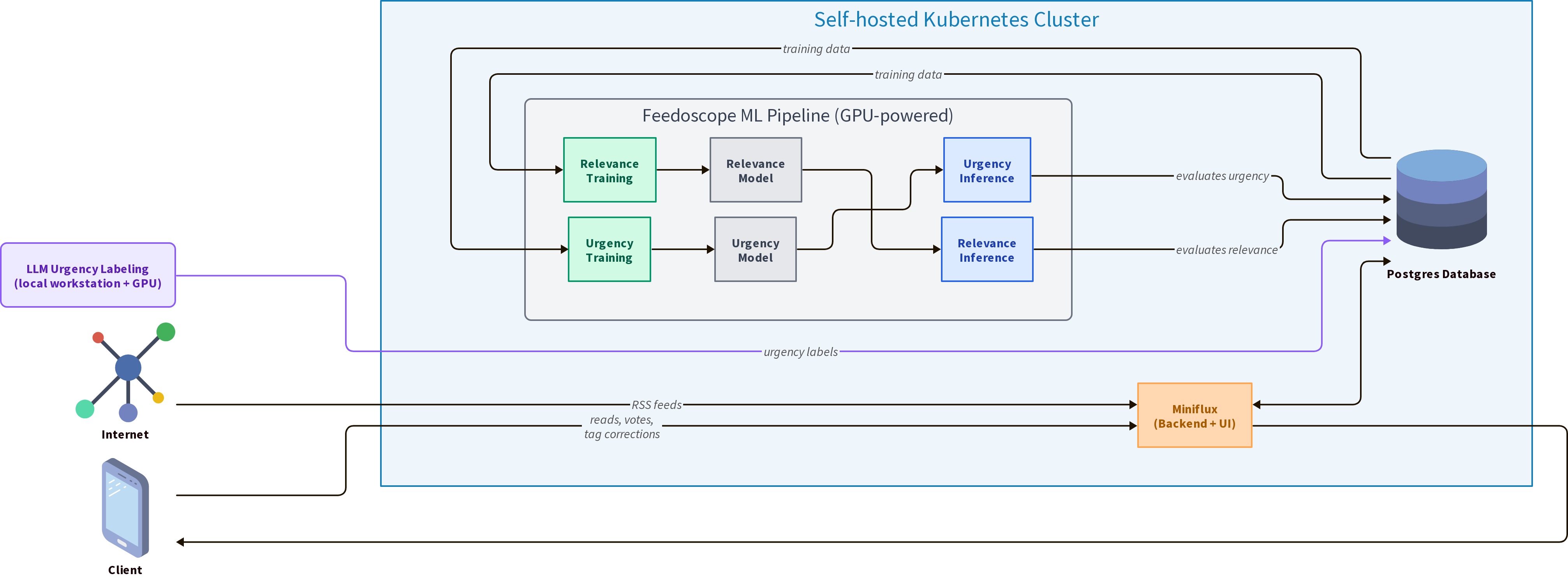
- I used the Ministral 8B decoder model to label articles with binary urgency scores, then trained a ModernBERT encoder model on this data (knowledge distillation)
- The distilled encoder model is about half the size of the encoder model and it produces a continuous urgency probability instead of a binary score
- The distilled model is about 40x faster than the original decoder model
- I don’t need llama in the Docker image anymore
- The full code is available here under MIT license
This article is a follow-up to the previous one. I recommend reading it first to understand the context.
Migrating from Tiny Tiny RSS to Miniflux
I had been running Tiny Tiny RSS (TTRSS) for about 5 years. It worked and I was mostly happy with it (apart from the community that felt somewhat unwelcoming), but the project was retired on the 2025-11-01. It changed ownership and is now hosted here, but I felt this was a good time to explore alternatives. I discovered Miniflux, and I decided to switch. Miniflux is written in Go, it’s lightweight, and uses PostgreSQL as the database, which is exactly what I needed since Feedoscope reads directly from the database. Miniflux is very minimalistic: it’s a tiny Go service that serves a simple UI (simple HTML pages with a tiny bit of javascript). It doesn’t have a mobile app, but the web UI is responsive and works well on mobile browsers. Since I can write Go, it also gives me the option to fork the code and implement custom features if needed.
The migration was mostly about rewriting all the SQL queries. The database schema is quite different between the two:
- In TTRSS, articles live in
ttrss_entriesand user-specific data (read status, scores, etc.) live inttrss_user_entries. In Miniflux, everything is in theentriestable, joined withfeedsfor the feed metadata - TTRSS uses
unreadas a boolean. Miniflux uses astatusfield with values likeread,unread, orremoved
I wrote a quick-and-dirty migration script to migrate the data from one database to the other. This was mostly painless.
Added features: vote, scores and tags
To use miniflux like I wanted, I had to add a few features:
- A voting system, where the user (me) can upvote or downvote an article.
- A scoring system, which allows miniflux to store, display and sort by the relevance scores computed by Feedoscope
- A tagging system, which allows me to assign tags to articles (for example, to correct the urgency labels produced by the model)
I tried implementing the first feature on the upstream Miniflux codebase, but the project is very minimalistic and the maintainers were not interested in adding features that are not strictly necessary for a feed reader (totally understandable). So I forked the code and implemented these features myself. The code is available here. This is one of the advantages of using a project written in a language I know: I can easily fork and customize it to my needs.
On a side note, I foresee this happening very frequently in the future, thanks to tools like Claude Code. A new feature is just a prompt away, and it’s very simple to take an open-source project that does 90% of what you need, and add the last 10% yourself. I implemented the 3 features above with Claude Code in just a few hours.
This is how it looks in the UI with these features implemented (note the upvote/downvote buttons and the relevance score):

Simplifying time sensitivity: from 1-5 to binary
In the previous article, I described a time sensitivity system with 5 categories (from 1/Evergreen to 5/Critical). I was using the Ministral 8B instruct model to assign one of these five scores to each article. It worked, but I had two problems with this approach:
- The 5-level scale was hard to reason about. The boundary between “Medium” and “High” was fuzzy, and I was not confident the model was making consistent distinctions between adjacent categories
- I couldn’t easily correct the model’s mistakes. If the model assigned a score of 3 to an article that should have been a 2, I had no practical way to fix it
I simplified the whole thing to a binary question: “Would this article still be relevant and informative one year from now?” If yes, the article is evergreen (score 0). If no, the article is urgent (score 1). This is much easier for both the model and me to reason about.
Here is the simplified prompt I use with Ministral:
[INST]
You are a news analysis AI. Your sole function is to classify an article's
urgency and return a valid JSON object.

**Objective:**
Determine if this article is time-sensitive. Ask yourself: "Would this
article still be relevant and informative one year from now?"

- If YES → score = 0
- If NO → score = 1

**JSON Output Schema:**
{
  "score": <0 or 1>,
  "explanation": <string, one sentence justifying your choice>
}

**Instructions:**
Respond with a single valid JSON object. No additional text, labels,
or markdown.

**Article Data:**
Title: <headline>
Summary: <article_summary_or_first_paragraph>
[/INST]
Distilling urgency into a small encoder model
Running the Ministral 8B model for inference requires a GPU with enough
VRAM to hold the model (it takes about 11GB of VRAM once loaded), and it
also requires installing llama-cpp-python, which makes the Docker image
much heavier and more complex to maintain. Simply using encoder models for
inference is much more practical, and it can even run on CPU if needed,
which frees up the GPU for other tasks. I just needed a way to get the
knowledge from the decoder model into a small encoder model.
The idea is simple: use the Ministral decoder model as a teacher to label a large number of articles, then train a small ModernBERT encoder model (the student) on these labels. This is a form of knowledge distillation. The teacher is expensive to run but produces good labels. The student is cheap and fast, and learns to mimic the teacher.
The pipeline works in three steps:
Step 1: Label articles with the decoder model
The Ministral model runs locally on my GPU and labels all articles from the
last 6 months with a binary urgency score (0 or 1). For each article, the
score is stored in the database, and a user tag (0-urgency or 1-urgency)
is assigned in Miniflux.
The tag assignment uses an INSERT-only pattern: if an article already has
an urgency tag, it’s never overwritten. This is crucial, because it means I
can manually correct the model’s mistakes directly in the Miniflux UI. If
the model says an article is evergreen but I disagree, I just change the tag
to 1-urgency. This correction will persist across pipeline re-runs, and
will be picked up by the next training run.
Step 2: Train the encoder model on the labels
The training script pulls all articles that have an urgency tag (either assigned by the model or manually corrected by me), and fine-tunes a ModernBERT-base model for binary classification. The training data comes from the Miniflux user tags, not from the raw LLM output table. This means that my manual corrections flow directly into the training data.
Step 3: Run inference with the distilled model
Once trained, the distilled ModernBERT model produces a continuous urgency probability between 0.0 and 1.0 for each article (instead of a hard 0 or 1). This is much more useful than a binary score, because I can use this probability to interpolate the half-life of the exponential decay:
- An urgency probability of 0.0 (fully evergreen) gives a half-life of 365 days
- An urgency probability of 1.0 (fully urgent) gives a half-life of 10 days
- An urgency probability of 0.5 gives a half-life of about 187 days
def compute_decay_rate(urgency_prob: float) -> float:
    half_life = 365 + urgency_prob * (10 - 365)
    return math.log(2) / half_life
This replaced the lookup table I had before (with discrete decay rates for each of the 5 categories). The continuous probability produces smoother transitions and is, in my opinion, more elegant.
In production, the distilled ModernBERT urgency model takes ~0.03s per article. For comparison, the Ministral decoder model takes about 1.2s per article. That’s a ~40x speedup.
How it all fits together
The full pipeline runs like this:
- Periodically (when I have new unlabeled articles): run
make
time_simple
to label articles with Ministral. This is the expensive step, but it only runs on articles that don’t have a score yet - Occasionally: run
make train_urgencyto retrain the distilled ModernBERT urgency model on the latest labels (including my corrections) - Every 30 minutes: run
make full_infer, which:- Runs urgency inference with the distilled model (fast)
- Runs relevance inference with the relevance model (fast)
- Applies the exponential decay using the urgency probability
- Writes the final scores to the database
The Docker image for production only includes PyTorch and the Transformers
library. It doesn’t need llama-cpp-python at all, because the Ministral
model is only used locally for labeling. This keeps the image much lighter.
Conclusion
I’m happy with how this turned out. The migration to Miniflux simplified a lot of things, and the tagging system turned out to be a perfect fit for the urgency correction workflow. The distillation approach gives me the best of both worlds: the reasoning ability of a large decoder model for labeling, and the speed of a small encoder model for production inference.
In the future, I want to use the user tags more extensively to classify articles into different categories (not just urgency), and train specialized models for each category. For example, I could have a “topic” tag that classifies articles into topics like “AI”, “health”, “finance”, etc., and then train separate relevance models for each topic.
If you’re interested in the code, it’s all on GitHub.